What is X Spaces?
X Spaces(previously Twitter Spaces) is a live audio conversation feature on the X platform, enabling users to host and participate in real-time discussions on various topics. Launched in November 2020, it allows users to engage with their followers and a broader audience through interactive audio sessions, free from character limits.
More About X Spaces
Did you know? X Spaces, the platform's live audio conversation feature, can host up to 11 speakers in a single Space at one time, allowing for dynamic and engaging discussions with multiple participants. This makes it a powerful tool for collaborative conversations and real-time audience interaction.
Let's explore some of the key features of X Spaces:
1. Live Audio Conversations - X Spaces allows you to host live audio conversations where followers and other users can join as listeners or speakers. This is perfect for creating a more engaging and interactive experience compared to traditional posts or threads.
Example: Imagine you are a tech influencer discussing the latest smartphone release. By hosting a Space, you can directly interact with your followers, answer their questions in real-time, and share your insights more effectively.
Here's an example of a live X Space.
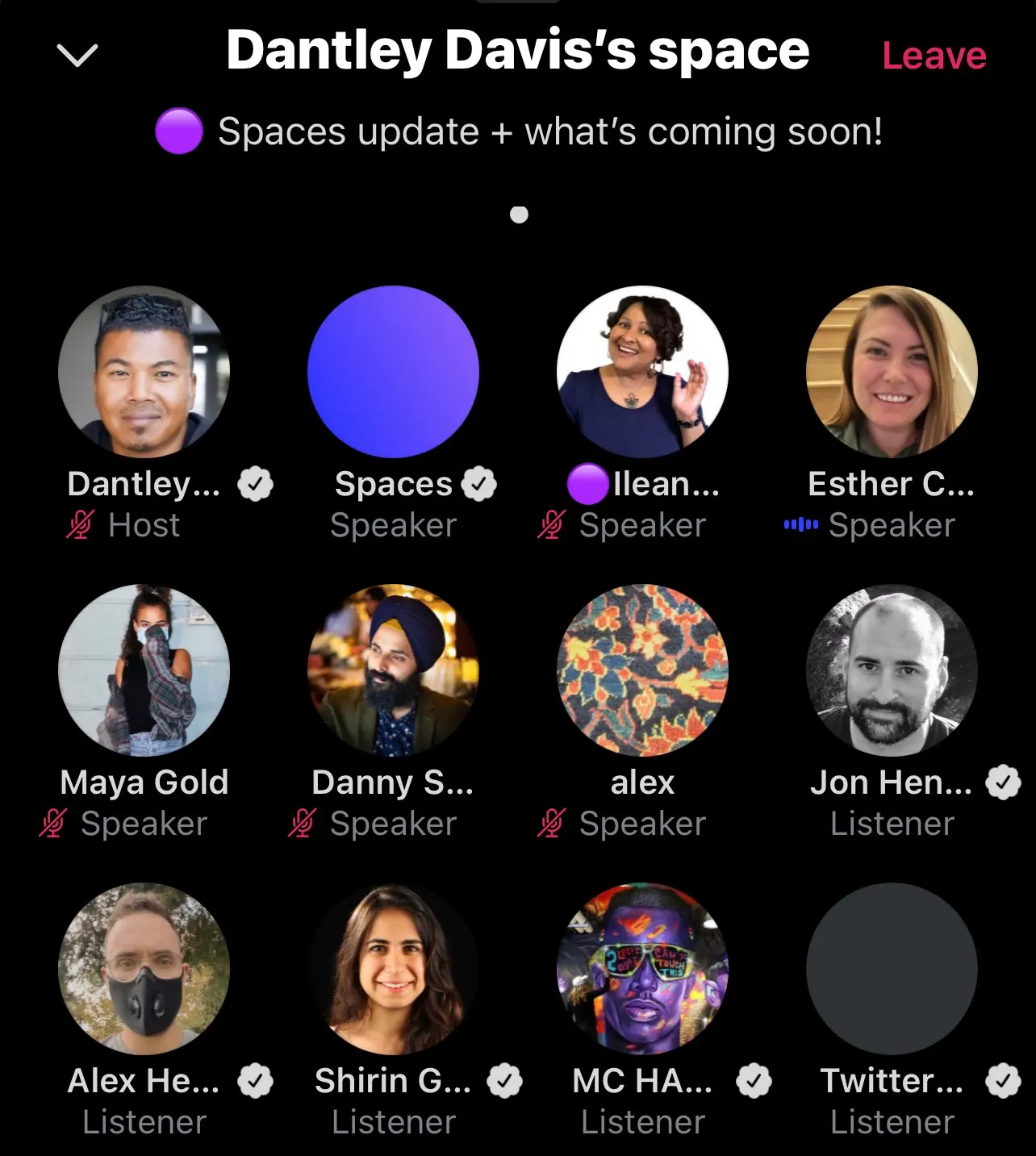
2. Ticketed Spaces - To support creators, X introduced Ticketed Spaces, where hosts can charge an entry fee ranging from $1 to $999. This feature provides an opportunity to monetize your content and create exclusive sessions for your audience.
Example: A fitness coach could host a premium Q&A session or a live workout class, charging attendees for access. This not only adds value but also generates income.
3. Speaker Management - As a host, you have complete control over who gets to speak in your Space. You can invite people to speak, mute speakers, or remove them if necessary. This ensures that the conversation stays on track and remains respectful.
Example: During a book club discussion, you can invite the author to speak, while also allowing participants to ask questions, creating a lively and controlled discussion environment.
Here's how you can host a X Space:
- Open the X App: Navigate to the Spaces tab.
- Create a Space: Tap the plus icon next to the microphone icon to start creating your Space.
- Set Up Your Space:
- Title: Choose a descriptive title that tells your audience what the conversation will be about.
- Topics: Select up to three related topics to make your Space discoverable.
- Recording: Decide whether to record the Space for later playback.
- Schedule: You can start immediately or schedule the Space for a later time, with the option to schedule up to 10 Spaces 30 days in advance.
Here's another example of a live X Space.

Let's look at the benefits and uses of X Spaces:
- Engage with Your Audience - X Spaces is an excellent tool for engaging with your audience on a deeper level. It allows for real-time interaction, which can be more impactful than traditional posts.
Example: Brands can use Spaces to host live product launches, AMA sessions, or panel discussions, creating a more immersive experience for their audience.
- Build Community - Spaces can help build a sense of community among your followers. By hosting regular discussions, you can create a loyal and engaged audience.
Example: A non-profit organization could host weekly Spaces to discuss their ongoing projects, share updates, and engage with their supporters directly.
- Supplement Your Content - Use X Spaces to supplement other content formats like podcasts, videos, or blog posts. It provides an additional platform to discuss and expand on topics covered in your content.
Example: A podcaster could host a live Space after releasing an episode to discuss the topics covered and answer listener questions in real time.
FAQ
What is X Spaces and how can it benefit my social media strategy?+
X Spaces is a feature within the X app that allows users to host and participate in live audio conversations. It's an excellent tool for engaging with your audience in real-time, creating a sense of community, and discussing topics of interest without the limitations of text.
How do I start a X Space?+
Starting an X Space is simple. Open the X app and go to the Spaces tab. Tap the plus icon next to the microphone to create a new Space, then enter the title and topics. You can also choose to record the Space. Finally, decide whether to start it right away or schedule it for later.
Can I monetize my X Spaces?+
Yes, you can monetize your X Spaces through Ticketed Spaces. This feature allows you to charge an entry fee for your audio sessions, providing a new revenue stream. You can set ticket prices from $1 to $999 and control the number of attendees.
Who can join my X Spaces, and can I control the participants?+
Anyone with a X account can join your Spaces, but you have control over who can speak. As a host, you can manage speaker permissions, invite co-hosts, and even remove participants if necessary. You can set the Space to allow everyone, people you follow, or only invited guests to speak.