30 LinkedIn Profile Tips and Tricks to Stand Out in 2024
There is not one formula to create the perfect profile, but you can optimize yours with these LinkedIn profile tips to boost your network & generate leads.
If you're not taking LinkedIn seriously, you're already falling behind. The early adopters have reaped the benefits, but it's not too late to catch up. Your journey to the front row starts with your LinkedIn profile. This guide will cover everything you need to know about LinkedIn profile tips for entrepreneurs.
Optimizing Your LinkedIn Profile Settings
Account Preferences
To begin, adjust your account settings for maximum visibility and privacy:
- Profile Photos: Set to "All LinkedIn members".
- People Also Viewed: Turn this setting "Off" to prevent distractions.
Visibility Settings
Enhance your profile's discoverability:
- Full Last Name: Make sure your full last name is visible.
- Profile Discovery Off LinkedIn: Set this to "On" but review other data settings carefully.
- Profile Updates: Turn off notifications for profile updates to avoid spamming your network.
How to Update Your LinkedIn Profile Tips
Profile Picture
Ensure your photo is consistent with your personal brand and LinkedIn cover photo. This helps in creating a cohesive and professional profile. A couple more things to keep in mind:
- Ensure your picture is at least 400 x 400 pixels but can be up to 4320 x 7680 pixels.
- Use PNG, JPG, or GIF with a maximum file size of 8 megabytes.
- Use a camera with portrait mode for a professional look.
- Opt for clean, professional backgrounds like cityscapes or natural settings.
- Wear something professional but reflective of your personal style. Avoid overly casual or overly formal attire that doesn’t represent your daily professional self.
- Use tools like PFP Maker to adjust backgrounds, colors, and shadows for added visual appeal.
- With Photofeeler, get feedback on your photo’s likability, trustworthiness, and competence from a community of users.
- Add a subtle colored circle around your profile picture using tools like Canva to make your photo stand out in search results.
Headline
Before making changes, assess your current headline. Use tools like Headline Analyzer to get a score and personalized feedback. This tool will evaluate your headline based on criteria designed to increase search visibility, profile views, and job opportunities.
Example Headlines Combining Keywords and Value
- Digital Marketer: Digital Marketer | SEO & PPC Expert | Boosted Online Sales by 40% through Targeted Campaigns
- Content Creator: Content Creator | Video Marketing | Produced 100+ Engaging Videos with 1M+ Views
- Life Coach: Life Coach | Personal Development | Guided 500+ Clients to Achieve Life Balance & Career Success
- Financial Advisor: Financial Advisor | Wealth Management | Increased Client Investments by 30% in 2 Years
- Fitness Coach: Fitness Coach | Strength Training | Helped Clients Lose 1,000+ Pounds and Achieve Fitness Goals
- Photographer: Photographer | Wedding & Event Photography | Captured Memorable Moments for 200+ Clients
- Web Developer: Web Developer | E-commerce Solutions | Built Custom Websites That Generated $1M+ in Sales
- Consultant: Consultant | Business Strategy | Advised 50+ Startups, Resulting in 80% Success Rate
- Restaurateur: Culinary Innovator | Established and Scaled 3 Successful Restaurants
About Section
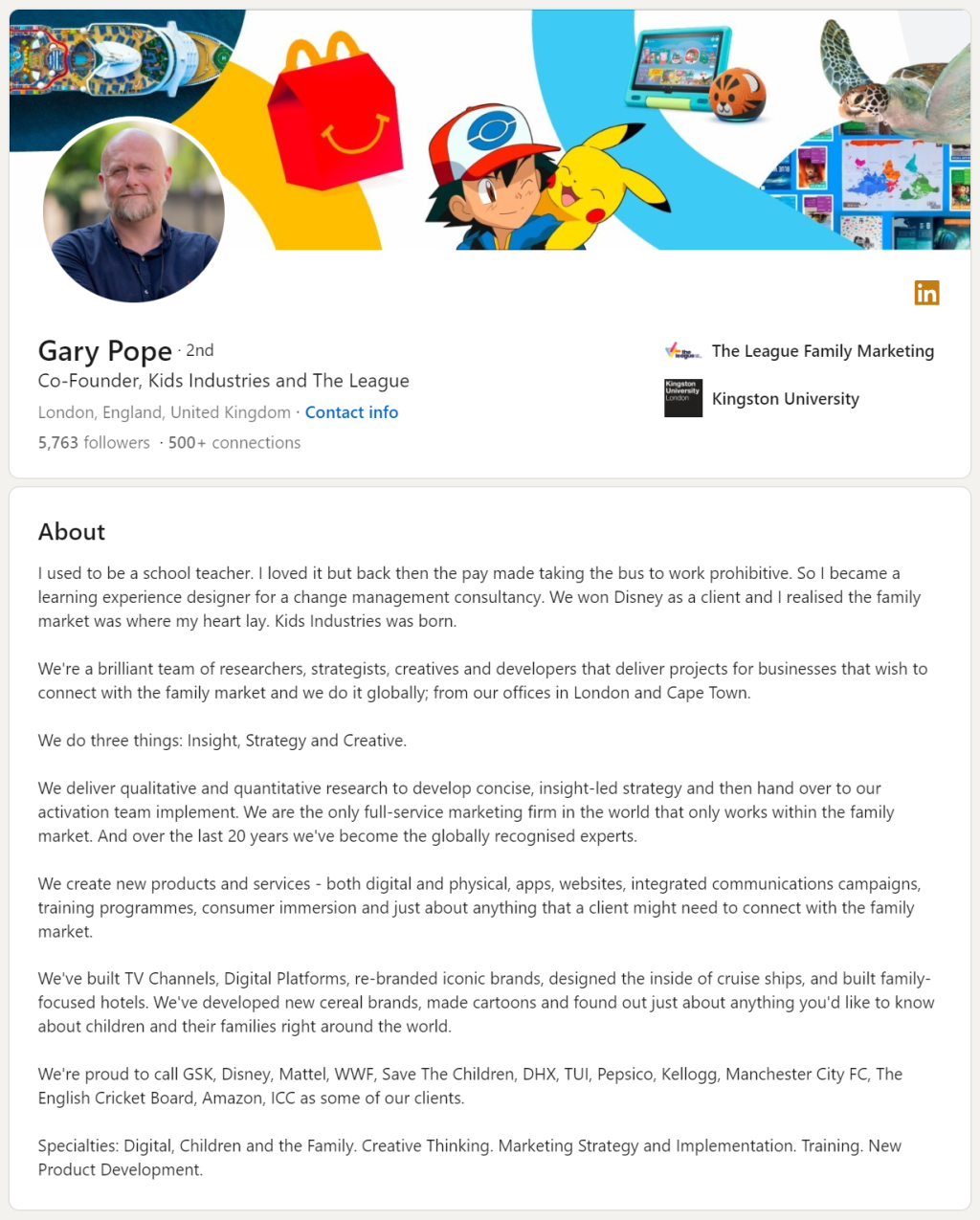
Source: LinkedIn
Gary, co-founder of Kids Industries, stands out by starting with an intriguing statement about his past as a school teacher, which invites curiosity about his journey. He explains how working with Disney marked a pivotal moment that led him into family marketing. Gary further establishes credibility by naming specific clients, products, and specialties
Experience
Make your description scannable for readers by following these tips:
- Include subheadings like "Responsibilities," "Achievements," "Tech-stack," and "Tools."
- Use bullet points instead of lengthy paragraphs.
- Try Google's X by Y by Z formula: "Accomplished [X] as measured by [Y], by doing [Z]."
Emphasize your most significant achievements by asking questions like:
- What features did you contribute to launching?
- How quickly did you achieve targets?
- Did you increase sales, traffic, conversions, safety, customer satisfaction, or retention?
- Did you receive awards or titles during your tenure?
Skills and Endorsements
LinkedIn allows you to list up to 50 skills, but it's unnecessary to list this many. If you provide specific services, focus on highlighting up to 10 niche skills that best represent your offerings.
When people endorse you, they typically endorse the skills listed at the top because it's easier than scrolling through the entire list.
Reach out to your immediate network. Mention a project you worked on together or a service you provided. Remind them of what you delivered and ask if they would endorse you for a specific skill. Once you've sent the message, visit their profile and endorse them for a skill you know they excel in. Sending a personalized message with quality content and endorsing them first increases the likelihood of receiving an endorsement in return.
LinkedIn Profile Optimization for SEO
Increase Profile Visibility
Optimize your LinkedIn profile for search engines:
- Keyword-Rich Headline: Include primary keywords in your headline.
- Detailed Experience: Use keywords throughout your job descriptions.
- Skills Section: Ensure all relevant skills are listed and endorsed.
Showcasing Your Expertise
Demonstrate your expertise through your profile:
- Featured Section: Highlight your best work and achievements.
- Portfolio Links: Include links to your portfolio, blog, or other relevant sites.
- Publications and Projects: List any publications, projects, or presentations.
Enhancing Industry Credibility
Sharing content from reputable sources and engaging with your network builds credibility:
- Share White Papers and Analysis: Post content from respected institutions and industry leaders.
- Discuss New Regulations: Offer your thoughts on new industry regulations and ask for opinions from your network.
- Highlight Industry Developments: Congratulate companies on achievements, share tech advancements, and post photos from events.
- Share Market Trends and Customer Stories: If you're in a less technical industry, focus on broader trends and relevant stories.
LinkedIn's Video Evolution
LinkedIn is embracing the short video trend, a move that follows in the footsteps of popular platforms like TikTok. With the introduction of a new 'Video' tab featuring short, vertical videos, LinkedIn aims to blend professional content with modern social media trends. But how will this shift impact LinkedIn's professional environment?
Unlike TikTok, which covers a wide range of topics from cooking to comedy, LinkedIn's videos will center on professional and career development. Users can expect content that offers job-related tips and career advice from their favorite creators.
While TikTok provides a platform for diverse content, LinkedIn's approach will maintain a professional tone. Videos on LinkedIn will aim to educate and inform, focusing on job skills, industry insights, and career growth. This ensures that the platform remains a resource for professional development.
💡Related read: Sharing Video on LinkedIn, Video Length & More
How to Achieve Higher Engagement on LinkedIn Videos
1. High-Quality Video Snippets
Creating video snippets from longer podcasts, live streams or webinars you conduct or are invited as a guest on can captivate your audience. These short, impactful clips are more likely to be watched and shared due to easy consumption, driving higher engagement rates on your LinkedIn profile.
2. Utilize quso.ai's AI-Powered Features
The AI Virality Score can help identify what video content resonates most with your audience, allowing you to fine-tune your strategy for maximum impact. Additionally, Viddy, our AI content assistant, provides instant content ideas, streamlining the brainstorming process and ensuring your video ideas are always fresh and engaging.
💡Related read: Agency Clients Achieve 45.12% Higher LinkedIn Engagement with quso.ai
3. Maintain Consistent Posting Schedules
Regular posting is crucial for maintaining visibility and engagement. quso.ai's scheduling tools enable you to plan and automate your posting schedule, ensuring consistent and timely content delivery across platforms.
Takeaway
Remember, your LinkedIn profile is more than just a resume; it's a dynamic landing page that showcases your professional brand. By continuously refining and updating your LinkedIn profile, you stay ahead in the competitive job market and attract the right opportunities.
Sign up with quso.ai today to schedule and publish LinkedIn videos and maximize your existing content.
Turn this into 30 clips.
Drop your long video into quso and let IntelliClips do the editing.
Start clipping free