How to Make a YouTube Short That Increases Your Engagement
Learn how to make a YouTube Short effortlessly with quso.ai’s comprehensive guide. Discover the step-by-step process to maximize your engagement and captivate your audience.
YouTube Shorts has revolutionized the way we consume videos. In fact, content creators stand to gain numerous benefits from incorporating short-form videos into their content strategy. Read this blog to get a breakdown of how to make a YouTube Short in a few easy steps.
Why Upload YouTube Shorts
- Repurpose existing YouTube content by resizing the aspect ratio.
- Enhance channel visibility on the app, facilitating easier discovery of your videos.
- Reach new audiences and expand subscriber count, catering to viewers who prefer short-form content.
- Collaborate with fellow YouTubers by remixing their Shorts.
- Expedite eligibility for monetization with 10 million valid public Shorts views in the last 90 days.
Exploring YouTube Short Ideas
The versatility of YouTube Shorts opens doors to various content ideas, including:
- Before-and-after demonstrations: Showcase transformations, renovations, or personal progressions in a concise format.
- Life hacks: Share practical tips and tricks in areas like cooking, cleaning, or organization.
- Condensed vlogs: Present highlights of daily experiences in a condensed, visually appealing format.
- FAQ responses: Address common audience queries efficiently through quick FAQ Shorts.
- Expert advice: Provide concise advice or tips on specific skills or life topics.
- Trailer teasers: Tease full-length videos with Short excerpts, prompting viewers to explore further.
- Instructional guides: Simplify complex tasks or recipes into easily digestible instructional Shorts.
💡Related read: How to Start a Podcast Channel on YouTube for Free
How Long can a YouTube Short be
Shorts can extend up to 3 minutes, comprising either multiple 15-second segments or a single continuous video. Videos must adopt a vertical orientation with a 9:16 aspect ratio and maintain a resolution of 1920 pixels by 1080 pixels.
For more information on YouTube Shorts dimensions and mistakes to avoid, check out our blog linked above.
How to Make a YouTube Short on Mobile
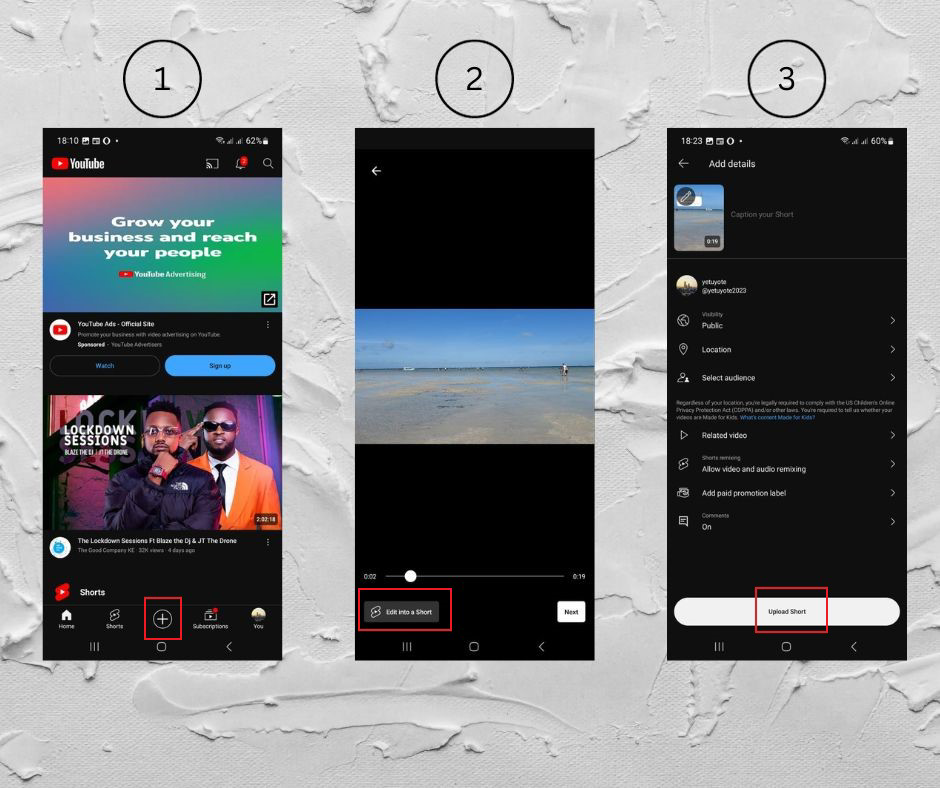
Here’s how to upload Youtube Shorts on mobile in 6 easy steps:
- Sign in to the YouTube app.
- Tap the "+" button and select "Create a Short."
- Toggle to change the length of YouTube videos.
- Hold the "Capture" button to record and tap again to stop.
- Add a title and set audience preferences,
- Tap "Done" to preview and enhance your video with various editing tools.
How to Make a YouTube Short on Desktop
Here’s how to upload Youtube Shorts on mobile in 4 easy steps:
- Sign in to YouTube Studio.
- Click "Create" and choose "Upload videos."
- Select a vertical video up to 3 minutes long.
- Fill out details and publish as usual.
8 Tips for Maximizing Engagement on YouTube Shorts
1. Optimize Video Length and Format
To maximize your Shorts' impact, you need to nail both length and format. Your Shorts should run between 15-30 seconds – this sweet spot keeps viewers engaged without losing their attention. Shorter videos often perform better because they deliver quick value and are more likely to be watched multiple times.
When filming, use the vertical 9:16 format (1080x1920 pixels) exclusively. This format maximizes screen real estate on mobile devices, where most Shorts viewing happens. Fill the entire frame with your content – avoid horizontal footage that creates black bars and wastes valuable screen space.
Technical Specifications:
- Resolution: 1080 x 1920 pixels (9:16 ratio)
- Frame Rate:
- 30fps for most content
- 60fps for action, sports, or fast-moving demonstrations
- 24fps for cinematic-style content
- Minimum Bitrate:
- 1080p: 8-12 Mbps for 30fps
- 1080p: 10-15 Mbps for 60fps
- Audio Quality: 48kHz, 256kbps stereo
2. Leverage Hashtags and Descriptions
Your description strategy can make or break your Shorts' discoverability. Always include #Shorts as your primary hashtag – this signals to YouTube's algorithm that your content is specifically created for the Shorts format.
Research and add 3-5 additional hashtags that directly relate to your content's topic. Look for trending hashtags in your niche, but only use them if they genuinely match your content.
For descriptions, front-load your most important keywords in the first sentence. Create compelling, action-oriented descriptions that tell viewers exactly what they'll learn or experience. End every description with a strong call-to-action that prompts engagement.
For example: "Drop a '💡' if this helped you!" or "Share your best tip in the comments!" Keep your CTAs varied and specific to your content to avoid seeming stereotypical.
Primary Hashtags (Always Include):
- #Shorts
- #[YourNiche]Shorts
- #[YourMainKeyword]
Research Methods:
- Use YouTube's search suggestion feature
- Monitor trending topics in your niche
- Analyze competitor hashtags (top 10 channels in your space)
- Track hashtag performance through YouTube Analytics
Hashtag Placement:
- First position: #Shorts
- Second position: Most relevant topic hashtag
- Remaining 2-3: Mix of broad and niche-specific tags
3. Post Consistently at Optimal Times
Timing significantly impacts your Shorts' performance. Use YouTube Analytics to identify when your specific audience is most active. Look for patterns in your highest-performing Shorts' posting times.
Most channels see peak engagement during weekday evenings (6-9 PM local time) and weekend afternoons. However, your optimal posting times depend on your target audience's location and habits.
Maintain a consistent posting schedule that you can sustain long-term. If you can post daily, do so – this gives you more opportunities to appear in the Shorts feed. If daily posting isn't feasible, aim for at least 3-4 times per week at consistent times.
The algorithm favors channels that maintain regular posting schedules, as it signals reliability and commitment to the platform.
4. Encourage Comments and Feedback
Drive meaningful engagement by making comment generation a core part of your content strategy. Design your Shorts to naturally prompt discussion. Ask specific, thought-provoking questions that relate directly to your content.
Instead of generic prompts like "What do you think?", use targeted questions such as "Which of these three techniques will you try first?" or "What's your biggest challenge with [specific topic]?"
Pin strategic comments immediately after posting. Your pinned comment should either extend the video's value (like sharing an additional tip) or pose an engaging question that encourages viewer interaction.
Respond to early comments quickly – this creates momentum and shows YouTube that your content generates active discussion. Consider creating "response Shorts" to thoughtful comments, which can turn one-time commenters into loyal followers.
Comment Generation Strategy:
- Question Types by Content:
- How-to Videos:
- "What's your biggest challenge with [topic]?"
- "Which step did you find most helpful?"
- "What other tips would you add?"
- Educational Content:
- "What surprised you most about [topic]?"
- "How will you apply this in your work/life?"
- "What questions do you still have?"
- Entertainment/Lifestyle:
- "Share your similar experience!"
- "Rate this technique 1-10!"
- "Tag someone who needs to see this!"
- How-to Videos:
5. Incorporate Trending Music and Sounds
Strategic use of audio can significantly boost your Shorts' performance. Monitor the Shorts audio library for trending sounds in your niche. When you find trending audio that fits your content, use it within the first 24-48 hours of it gaining popularity. This increases your chances of appearing in trend-based feeds.
Balance trending sounds with your original audio needs. If your content includes speaking, keep background music at 20-30% volume to maintain clarity. Test different audio styles – some content performs better with trending music, while other topics need clear voiceovers or natural sound.
Always credit audio sources in your description to avoid copyright issues and provide transparency to viewers.
6. Experiment with Looping Content
Create Shorts that viewers want to watch multiple times by mastering the art of seamless loops. Design your content so the end transitions naturally back to the beginning. This could mean creating perfect visual loops, using transitions that flow smoothly, or building suspense that makes viewers want to rewatch for details they missed.
Effective looping strategies include:
- Before/after reveals that transition smoothly
- Step-by-step tutorials where the final result leads back to the starting point
- Transformation videos with smooth transitions
- Puzzle or mystery content that requires multiple views to fully understand
- Skill demonstrations that appear continuous
Loop Structure Types:
- Visual Loops:
- Seamless Transitions:
- Match cut techniques
- Color matching points
- Motion continuity
- Frame-perfect alignment
- Loop Duration Categories:
- Micro-loops (3-5 seconds)
- Standard loops (8-12 seconds)
- Extended loops (15-30 seconds)
- Seamless Transitions:
Content Loop Techniques:
- Before/After Transitions:
- Transformation Shots:
- Match position exactly
- Maintain consistent lighting
- Use identical camera angles
- Control background elements
- Progress Sequences:
- Step-by-step alignment
- Time-lapse formatting
- Milestone markers
- Progress indicators
- Transformation Shots:
Advanced Loop Strategies:
- Psychological Hooks:
- Pattern Interruption:
- Unexpected elements
- Visual surprises
- Pattern breaks
- Curiosity gaps
- Cognitive Loops:
- Open questions
- Incomplete sequences
- Mystery elements
- Puzzle components
- Pattern Interruption:
7. Cross-Promote Shorts on Other Platforms
Maximize your Shorts' reach by strategically sharing them across multiple platforms. Download your Shorts without watermarks and optimize them for each platform's specific requirements. When sharing on Instagram Reels, add platform-specific hashtags and adjust your caption style. For TikTok, consider adding trending sounds from that platform.
On Facebook Stories, keep content shorter and add strong visual elements that work without sound. Develop a cross-promotion schedule that spaces out your sharing across platforms.
This prevents overwhelming your audience and gives each post time to gain traction. Track which platforms drive the most engagement back to your YouTube channel and prioritize those in your sharing strategy.
8. Analyze Performance and Refine Strategy
Implement a robust analytics review process to continuously improve your Shorts performance. Focus on these key metrics:
- Average view duration: Aim for at least 75% retention
- Like-to-view ratio: Target 10% or higher
- Comment rate: Look for at least 1-2% of views generating comments
- Share rate: Track how often viewers share your content
- Click-through rate to your channel: Monitor subscriber conversion
Review your analytics weekly to identify patterns in your highest-performing content. Document specific elements that correlate with better performance, such as:
- Video length
- Opening hook styles
- Types of calls-to-action
- Music choices
- Posting times
- Content themes
Create a testing schedule to systematically improve these elements. Test one variable at a time and track results over at least 5-10 posts before drawing conclusions. Use this data to develop content templates that consistently drive engagement while still allowing for creativity and experimentation.
Keep a detailed record of your findings and update your content strategy monthly based on your results. Focus on replicating successful elements while continuously testing new approaches to stay ahead of platform trends and algorithm changes.
Repurpose YouTube Shorts for Wider Reach
Given the popularity of vertical 9:16 aspect ratio videos on various social media platforms, creators can extend the reach of their Shorts by repurposing and sharing them to a broader mobile audience. Create your Shorts video in quso.ai, then save and share to grow your video content on platforms like TikTok, Instagram, Facebook, LinkedIn, and Twitter.
💡Related read: How to Share a YouTube Video on Instagram with quso.ai
How to Create YouTube Shorts from Existing Videos
For creators new to YouTube, quso.ai streamlines content creation, delivering customized and polished videos without requiring advanced editing skills.
If you’re wondering how to make YouTube Shorts from existing YouTube videos, turn to quso.ai for your repurposing needs:
- Navigate to quso.ai and click on the "New Project" button.
- Paste the YouTube URL of the longform video.
- While the video processes, you can rename it or move it to a folder as per your needs.
- Access generated clips by clicking on the video and previewing all clips.
- Shorts can be found in the "Shorts" tab, while chapters, downloads, and drafts are organized within each project.
- Downloaded content will appear in the download section of the specific project.
- Change templates by navigating to the template selection screen. Choose from saved, brand kit, or stock templates.
- Click on "Edit" to open the editor and access editing options. Add elements, edit subtitles/captions and make other necessary edits.
- After finishing edits, share or download the clip directly.
- Choose export settings or publish it to social media platforms directly from the editor.
Best Practices for Repurposing a YouTube Short Video
quso.ai offers everything you need to create awesome YouTube Shorts:
- Trim long videos into exciting Shorts using the YouTube cutter.
- Add background music without worrying about royalties.
- Let AI write video descriptions for you.
- Make your Shorts more accessible with AI subtitles.
Conclusion
By following this guide on how to make a YouTube Short, you're well on your way to creating short form content that not only captures attention but also inspires, entertains, and educates.
Top creators trust quso.ai for their YouTube Shorts. Try quso.ai for free today and enjoy all the AI video editing features it offers.
Turn this into 30 clips.
Drop your long video into quso and let IntelliClips do the editing.
Start clipping free