Best Time to Post on Instagram for Maximum Views & Likes
Discover the best time to post on Instagram to improve engagement for various time zones. Know the ideal universal posting time, as researched by quso.ai.
In the bustling world of hashtags and endless scrolling, timing is everything when it comes to capturing maximum attention. With Instagram emerging as a powerhouse of engagement, knowing when to hit that share button makes all the difference. However, there isn't a one-size-fits-all answer for the best time to post on Instagram. Read our blog to understand the ideal universal posting time for engagement across time zones and audiences.
Understanding Time Zones
The activity of your audience on Instagram can vary greatly depending on their geographical location. Here’s a breakdown of the best times to post on Instagram Reels for different locations:
- Australia: Weekdays from 6 pm to 8 pm and weekends from 11 am to 1 pm
- United States of America: 8 am and 5 pm on weekdays and 9 am on weekends
- United Kingdom: 8 am and 5 pm on weekdays and 12 pm to 2 pm on weekends
- Malaysia: 12 pm to 2 pm and 6 pm to 8 pm on weekdays and 10 am to 12 pm on weekends
- Canada: 9 am and 6 pm on weekdays and 10 am to 12 pm on weekends
- Europe: 8 am and 5 pm on weekdays and 10 am on weekends
- India: 7:30 pm on weekdays and 8:30 pm on weekends
Worst Times to Post on Instagram
Before we dive into when to post on Instagram, it's essential to highlight the times you might want to avoid. Surprisingly, the overall worst time to engage with your audience on Instagram falls during the day on Wednesday, specifically between 10 a.m. and 4 p.m., and on Thursday night, between 9 pm and 11 pm. These periods see a significant dip in user activity for various reasons, including work commitments and the onset of weekend plans.
Best Time to Post on Instagram Daily
Research indicates that weekdays are prime for Instagram posts. Here's why:
- Early mornings (6 am-9 am) and evenings (5 pm-6 pm) see high activity as people check Instagram during their commute or after work.
- Lunch hours (12 pm-2 pm) also offer good engagement opportunities.
- Weekends are less popular, but you can still post until 2 pm when people are more likely to be active.
Dive deeper into the specifics, and you'll find the best days to post on Instagram in PST:
- Best time to post on Monday: 9 am to 10 am
- Best time to post on IG on Tuesday: 9 am to 10 am
- Best time to upload to Instagram on Wednesday: 5 am, 11 am, and 3 pm
- Best time to post on Thursday: 12 pm and 5 pm
- Best time to post on Friday: 9 am to 10 am and 5 pm to 6 pm
- Best time to post on Instagram on a Saturday: 8 am to 12 pm
- Best time to upload on Instagram on Sunday: 10 am to 2 pm
How to Find Your Best Time to Post on Instagram
Experimentation plays a crucial role in finding when to post on Instagram. Here are 5 ways to find the best time for you to post on Instagram:
1. Exploring the strategies of your competitors can provide valuable insights. Observing the timing and engagement of posts from brands similar to yours can uncover effective posting schedules. Tools like NapoleonCat and Preview can simplify this process by analyzing competitors' engagement metrics and identifying their most successful posting times, content preferences and hashtag usage.
2. A/B testing the performance of posts at different times can help identify patterns of higher engagement, allowing for data-driven decisions to refine your Instagram strategy.
3. Tailoring content to align with your audience's daily patterns and interests can enhance its impact. For instance, posting content related to evening activities later in the day may resonate more with your audience, increasing engagement.
4. Engagement rates, typically between 1-5%, are crucial metrics. By calculating your engagement rate and observing how it fluctuates with posting times, you can tailor your strategy to enhance interaction.
5. Ensure your account is set to Business or Creator mode to access Instagram Insights for understanding your audience's demographics.
- Within Insights, look for the “Total followers” section to find data on when your followers are most active, broken down by day and hour.
- Use a spreadsheet to record the activity times. Mark the peak activity times and note the performance of your posts in relation to these times.
- Over time, as you update your spreadsheet with new data, you will begin to see patterns emerge that highlight the best times for posting.
- Use this data to schedule your posts during peak times and monitor the engagement. Adjust your posting schedule as needed based on the results.
If you're a quso.ai user, you can also use our social media analytics feature to get deeper insights into the best times to post on Instagram.
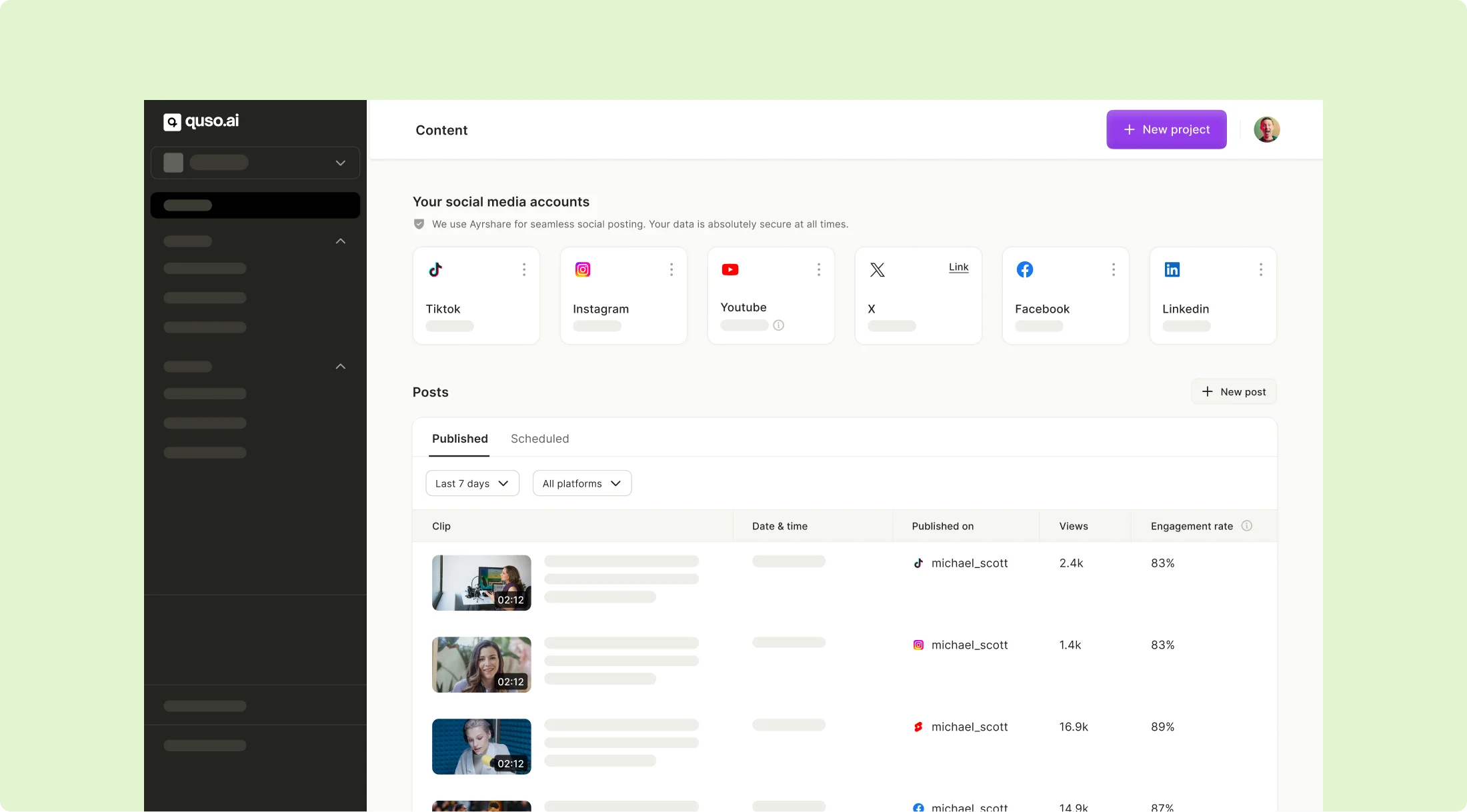
Uncover crucial insights like video views and engagement rate to optimize your marketing efforts on Instagram. Sign up on quso.ai to be among the first users to unlock social analytics.
💡Related read: How to Share a YouTube Video on Instagram with quso.ai
Why Choose quso.ai for Instagram Post Automation
- User-friendly interface: quso.ai designed with user experience in mind, making it simple for anyone to schedule and manage their Instagram content effectively.
- Advanced analytics: Beyond scheduling, quso.ai will also provide detailed insights into your content's performance, helping you refine your strategy and make data-driven decisions. The Analytics feature is part of quso.ai's future roadmap.
- Comprehensive social media management: Besides Instagram, quso.ai supports a wide range of social media platforms like X (previously Twitter), TikTok, YouTube, YouTube Shorts, LinkedIn and Facebook, making it a versatile tool for video content creators, podcasters, marketers, small businesses, and agency owners.
- Effortless planning for key dates: Planning content around holidays, events, and promotions is a breeze with quso.ai. Its Content Calendar helps you visualize and organize your content strategy well in advance, making sure you never miss an important date. Imagine effortlessly organizing your content calendars and getting valuable tips to boost your video performance on social media. Give our AI content assistant, Viddy, a try today by signing up and watch your workflow become smoother than ever!
- Advanced scheduling features: quso.ai goes beyond basic scheduling. It allows for the inclusion of tags and AI-generated descriptions in your Reels, enhancing the reach and relevance of your content. This feature is particularly useful for increasing visibility and engagement.
💡Related read: How to Add Multiple Styled Text to Instagram Reels
Implementing quso.ai Into Your Social Media Strategy
In conclusion, automating your Instagram posts with quso.ai not only saves you time but also enhances your social media strategy by ensuring your content reaches your audience when they’re most active and engaged. With its Content Calendar, Post Scheduler, and upcoming Analytics feature, quso.ai is an excellent tool for anyone looking to figure out the best time post on Instagram.
Turn this into 30 clips.
Drop your long video into quso and let IntelliClips do the editing.
Start clipping free